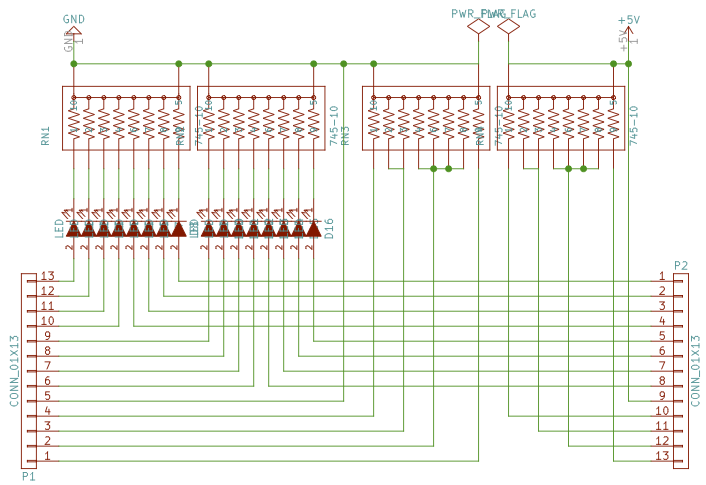
Recently I was bringing up an Arduino-like core for the ATtiny841, and wanted to test all the functionality. Testing digitalOut and analogOut was simple, though doing so for lots of pins required a bit of setup. digitalIn was also simple, but analogIn required slightly more work. As a small exercise, I decided to combine all of the required parts onto a single board. Using integrated resistor networks helped save a lot of parts.
The top part is very conventional, but the bottom might be a bit more interesting. Effectively, it serves as a primitive analog computer to generate a wide selection of fractions of the voltage applied to "+" and "-". As noted on the board, connecting one or more pins from the "+" side to one or more pins from the "-" side generates a voltage V*P/(P+M) where "P" is the sum of the labels of pins connected on the "+" side and "M" the sum on the "-" side. If "+" is 5V, you can obtain e.g.:
1V as 1/5 of 5V, by connecting "1" on the "+" side and "4" on the "-" side.
1.25V as 1/4, by connecting "1" on the "+" side, and 3 (as "1" and "2") on the "-" side.
1.5V as 3/10, by connecting "1" and "2" on the "+" side, and "1", "2", and "4" on the "-" side.
This week, I was honored to see my AutoISP family of boards being put into actual commercial production by Boxtec.
AutoISP is designed to help those among us ATtiny programmers who don't write perfect software on the first iteration. Previously, our alternatives were:
Pull the microcontroller from the board, plug it into a programmer, reprogram it, pull it from the programmer, and plug it back into the board.
Make the programming pins accessible on the board (e.g. with IC hooks or by adding an ICSP header to the board). This may limit the use to which those pins can be put otherwise (and sparing 4 data pins on an ATtiny85 for programming is rarely an attractive proposition).
AutoISP solves this problem by placing the microcontroller itself on a slave board which is plugged into a socket on the circuit to be developed. The AutoISP master board then employs an STMAV340TTR 4PDT "video switch" to switch between two states:
If the RESET pin on its ICSP header is HIGH (or not connected), all pins on the microcontroller are connected to the development circuit, as if the microcontroller were plugged into the circuit directly.
If the RESET pin goes LOW, the MOSI, MISO, RESET, and SCK pins on the microcontroller get disconnected from the development circuit and connected to the ICSP header on the master board instead, which allows the microcontroller to be reprogrammed.
This makes it possible to use AutoISP transparently with most ISP programmers (e.g. the ArduinoISP sketch or ScratchMonkey), as long as those programmers leave VCC turned on while not programming. With the exception of the RESET pin, all other pins of the microcontroller are available for unrestricted use.
All electronic are placed on the master board, while the slave boards merely have sockets and pin headers. At the moment, slave boards are available for the ATtinyX5 (25/45/85), ATtinyX4 (24/44/84) and ATmegaX8 (88,168,328) series, although the approach is applicable to any ATtiny or ATmega processor.
I might as well retitle my blog "The Art of the Blink Sketch", but this one has a bit of a twist:
The Quarantatre is a breakout board for the ATtiny43U microcontroller (basically just an implementation of the reference design shown in the AVR188 application note, though I did not follow the component layout recommendations all that closely).
In addition to the typical features found in other ATtiny models, the ATtiny43U has a built in boost converter allowing it to not only run off a single AA or AAA battery, but even to generate a regulated 3V voltage. While this only allows for a small current draw (apparently the limit is around 30mA), this could potentially be interesting for some applications.
The boost converter needs a few external components to work, and some of them, especially the Schottky diode, are not really available in breadboard friendly variants, so to truly test the boost converter, I had to make this custom PCB (available for ordering at OSH Park, design files on Github).
As usual, I've made an Arduino-style core available on Github at https://github.com/microtherion/arduino-tiny1634-43u (migrating from Google Code, which is shutting down). The standard Arduino tool chain probably won't support it; as always, I recommend CrossPack-AVR for OS X.
admittedly, the sound on the video is not recorded off the installation—I overdubbed the same MP3 file the installation plays on top of the video, so the fairly soft rendition of the audio through the simple speaker I used did not detract from the majesty of the visuals and the occasion.
I noticed that so far I had never written up an EL wire project, mainly because the software generally has all the sophistication of an LED blink sketch, the hardware is 95% off the shelf (I'd rather not tinker too much with the high voltage AC current involved in an EL wire project), and my craftsmanship with the wire shaping is undistinguished. Nevertheless, I thought it was time to show how a project like this can be done.
Bill of Materials
EL Wire — I mostly use Sparkfun's brand of EL Wire, bought mostly through Boxtec. Make sure whatever wire you buy has the right plugs. I bought some of my EL wire from Seeedstudio, and spent some rather instructive time and effort refitting it with the plugs I needed (some adhesive copper tape and a bit of heat shrink tube ended up working quite nicely). The wire I use is 2.3mm thick (the thinner, the more tightly the wire can be bent).
A speaker for the audio output. With some additional circuitry, the MP3 shield is also capable of sending a fairly reasonable quality output signal to an external amplifier (e.g. your stereo system).
Arranging the EL Wire
There are numerous ways of getting EL wire to keep whatever shape you want to form it. The technique I'm using (which I may have invented; I don't recall having seen it anywhere else) is to use a tight garden mesh with holes a bit bigger than the diameter of the EL wire, and weave the wire through it:
it turns out that it does not matter whether the EL wire runs on the front or the back side of the mesh: it is bright enough that it will be equally visible on both sides. EL wire can bend quite a bit, but if abused too much, it will eventually break, so my wiring tends not to be all that tight.
The EL wire I buy generally comes with a plastic cap at the end, and the mesh is tight enough that I need to remove the cap or cut off the end of the wire. I've generally not had problems with this practice, but in the new chasing EL wire, doing this seems to have created some sort of shortcut between the individual strands of wire, so I had to separate them a bit and put some electric tape around the end to fix the problem.
Code for EL Wire
Basically a glorified blink sketch, as I said. Rather than synchronize line by line, or note by note, I just synchronize with the start of the song, which happens to be recorded at a fairly steady 60bpm (except for a ritardando at the end which I'm ignoring). For the chasing wire, I'm using an adapter cable using 3 channels; I do the chasing with 2 channels on, 1 off at a time, although the other way around also works, of course.
Playing the MP3 File
For playing the MP3 file, I used Bill Porter's very convenient MP3 shield library, so the actual code to play the file was trivial:
The synchronization is simply done by connecting the TX pin of the Arduino to the RX pin of the EL sequencer, and then sending some data when ready. It certainly could have been made more precise, but for my purposes, I thought it close enough.